Have you ever found yourself stuck trying to locate a specific Windows directory while using PowerShell? If so, don't worry, because there's an easy solution that can save you time and frustration. In this article, we'll explore how to find specific Windows directories using PowerShell and discuss the handy `Environment.GetFolderPath` method and the `Environment.SpecialFolder` enumeration.
Showing posts with label Entwicklung. Show all posts
Showing posts with label Entwicklung. Show all posts
Tuesday, October 17, 2023
Wednesday, March 8, 2023
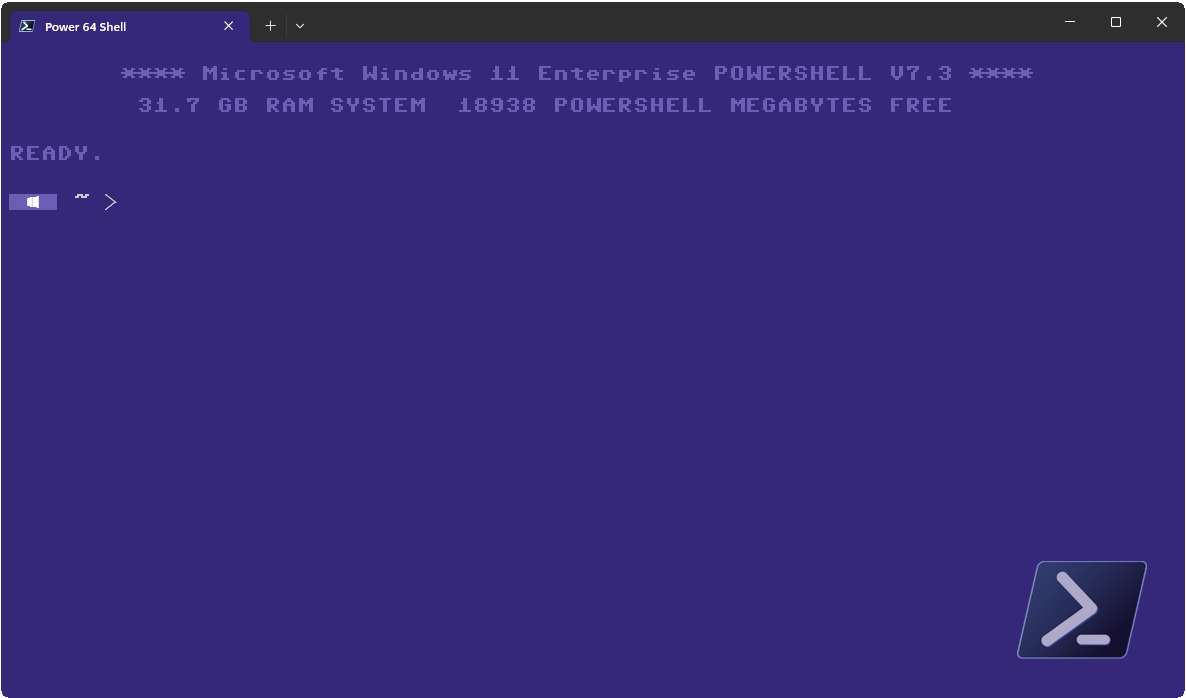
The Retro Terminal - Looking good in 8-Bit | Part 3
Since my last two articles, PowerShell, as well as the terminal itself, has evolved. It is therefore time to bring Retro PowerShell up to date. Where the first two parts cover Windows PowerShell, this article is an update for PowerShell Core and Windows Terminal and will show you how to let your Terminal look like a Commodore 64.
This post is

Friday, March 15, 2019
Setting SharePoint View properties with the PnP-Framework
The PnP-Framework has made a lot of task easier when taking care of a SharePoint environment. However, the documentation is still… ehem, let’s say developer friendly. In this article I’ll take a look at the Set-PnPView cmdlet and what values can be configured and why.
Wednesday, February 1, 2017
Code Snippet: Load the SharePoint Office PnP Module in PowerShell
How do you load the PowerShell OfficeP PnP module for SharePoint?
Addendum: I've added a try/catch block to the code. This way you can be sure the module is loaded.
# Loading Office Online PnP Module
try {
    if((Get-Module "Microsoft.Online.SharePoint.PowerShell" -ErrorAction SilentlyContinue) -eq $null) {
        Import-Module Microsoft.Online.SharePoint.PowerShell
        Write-Host "PowerShell module Microsoft.Online.SharePoint.PowerShell initialized"
    }
    else {
        Write-Host "PowerShell module Microsoft.Online.SharePoint.PowerShell loaded"
    }
}
catch {
    throw "PowerShell module Microsoft.Online.SharePoint.PowerShell initialization failed"
    exit 3
}
Thursday, September 1, 2016
Useful links
Sometimes I stumble upon links in the net I find useful. I tend to save these links for the future because I 'might' use them in some project. I'd like to share these links with you and maybe you find them useful as well for a future project of yours.
Enable Enterprise Keywords column in a blank siteEnable Enterprise Keywords column in a blank site
Trouble to enable the Enterprise keywords column? This might be the cause.
The 2013 SPSFarmReport
Get a overview of your SharePoint Farm.
SharePoint Health Analyzer Rules
The SharePoint Health Analyzer Rules project is a collection of configurable SharePoint health analyzer rules that extends out of the box Health Analyzer system by adding many important additional rules that help to ensure your SharePoint environment is kept in optimal condition.
SharePoint Managed Metadata Navigator
Use SharePoint Managed Metadata Navigator to browse, explore, create, update, delete, export and import MMD Groups, Termsets, and Terms for SharePoint 2010.
http://spribbonvisibility.codeplex.com/
Choose who can see the SharePoint ribbon.
http://ribbonmanager.codeplex.com/
Hide different elements on a SharePoint page.
SharePoint Social Networking
A Collection of solutions aimed at adding social networking to your SharePoint 2010 site. The collection will include web parts, ribbon extensions and other type of solutions that will add or enhance the social networking capabilities of SharePoint.
SharePoint Document Converter
SharePoint Document Converter solution gives a start on how we can leverage the Word automation Service to convert documents to formats that word can support. This project convert documents of type "DOCX" or "DOC" to any possible file type that word support like to PDF, XPS, DOCX, DOCM, DOC, DOTX, DOTM, DOT, XML, RTF, MHT.
Enable Enterprise Keywords column in a blank siteEnable Enterprise Keywords column in a blank site
Trouble to enable the Enterprise keywords column? This might be the cause.
The 2013 SPSFarmReport
Get a overview of your SharePoint Farm.
SharePoint Health Analyzer Rules
The SharePoint Health Analyzer Rules project is a collection of configurable SharePoint health analyzer rules that extends out of the box Health Analyzer system by adding many important additional rules that help to ensure your SharePoint environment is kept in optimal condition.
SharePoint Managed Metadata Navigator
Use SharePoint Managed Metadata Navigator to browse, explore, create, update, delete, export and import MMD Groups, Termsets, and Terms for SharePoint 2010.
http://spribbonvisibility.codeplex.com/
Choose who can see the SharePoint ribbon.
http://ribbonmanager.codeplex.com/
Hide different elements on a SharePoint page.
SharePoint Social Networking
A Collection of solutions aimed at adding social networking to your SharePoint 2010 site. The collection will include web parts, ribbon extensions and other type of solutions that will add or enhance the social networking capabilities of SharePoint.
SharePoint Document Converter
SharePoint Document Converter solution gives a start on how we can leverage the Word automation Service to convert documents to formats that word can support. This project convert documents of type "DOCX" or "DOC" to any possible file type that word support like to PDF, XPS, DOCX, DOCM, DOC, DOTX, DOTM, DOT, XML, RTF, MHT.
Thursday, October 29, 2015
Latest release of the SPBestWarmUp Script available
I finished the updates on the latest version of the SPBestWarmUp script and we’re heading version 2.0 (Stockholm). You can get it here on Codeplex.
SPBestWarmUp is a PowerShell script that will load all of your SharePoint web sites. By doing so it helps to populate the IIS and the asp.net caches. This will speed up accessing your server and give your users a better overall experience.
Change log:
Feedback is welcome. If you find any issue, please use the issues panel on the Codeplex project site.
SPBestWarmUp is a PowerShell script that will load all of your SharePoint web sites. By doing so it helps to populate the IIS and the asp.net caches. This will speed up accessing your server and give your users a better overall experience.
Change log:
- Removed the Internet Explorer to fetch webpages and switched instead to the Invoke-WebRequest Cmdlet. IE will be deprecated in the future anyway.
- Collecting all relevant Urls prior fetching them from the server.
- Temporarily removed the ability to use own Urls. Will be added in the future as a parameter and/or as a file. However, if you look at the code, you’ll find it isn’t hard to write your own little patch if you need to.
Feedback is welcome. If you find any issue, please use the issues panel on the Codeplex project site.
Wednesday, October 21, 2015
Change the SQL recovery model in bulk with the PowerShell
Sometimes you need to configure settings on your SQL server in bulk, like e.g. the recovery model. In my case, we needed to change all databases to the Full recovery model, due to the usage of Always-On. Scince SQL 2012 there is a great way to do this with the PowerShell.
First open a Powershell and see if the SQL PowerShell module is loaded.
Use ls or dir to see what options you have
Change the 'directory' with cd SQL. This way you go to the SQL server configuration. Do so as well for the servers host name and the SQL server instance, until you you enter the databases directory. Here you'll find all the databases hosted by the SQl server instance you choose. Now we can run the following script to change the recovery model in bulk.
First open a Powershell and see if the SQL PowerShell module is loaded.
Get-Module SQLPSIf it isn't loaded, do so by using
Import-Module SQLPSFor scripts you should check if the module is loaded before you import it like this:
if ((Get-Module "SQLPS" -ea silentlycontinue) -eq $null)
{
    Import-Module SQLPS -DisableNameChecking
}
Now you can change to the SQL server by simply entering SQLSERVER:Use ls or dir to see what options you have
Change the 'directory' with cd SQL. This way you go to the SQL server configuration. Do so as well for the servers host name and the SQL server instance, until you you enter the databases directory. Here you'll find all the databases hosted by the SQl server instance you choose. Now we can run the following script to change the recovery model in bulk.
foreach ($db in ls) {
  if ($db.RecoveryModel -ne "Full") {
    $db.RecoveryModel = "Full"
    $db.Alter()
  }
}
Wednesday, September 9, 2015
Toolbox: SharePoint 2013 Search Tool
Using the SharePoint REST API can be sometime a bit of a pain. Good to have some tools at hand that make life more easy. With the SharePoint 2013 Search Tool you learn how to build an HTTP POST query, and how the different parameters should be formatted.
After running the query, you can view all the different result types returned, e.g. Primary Results, Refinement Results, Query Rules Results, Query Suggestions and the actual raw response received from the Search service.
SharePoint 2013 On-Premise and Office 365 are both supported.
To download visit the project page at Codeplex:
https://sp2013searchtool.codeplex.com
After running the query, you can view all the different result types returned, e.g. Primary Results, Refinement Results, Query Rules Results, Query Suggestions and the actual raw response received from the Search service.
SharePoint 2013 On-Premise and Office 365 are both supported.
To download visit the project page at Codeplex:
https://sp2013searchtool.codeplex.com
Wednesday, February 18, 2015
SharePoint Tools: A new CAML Query Designer
Praveen Battula has released a new tool on his blog to work with CAML Queries. Not only you can export the plain CAML Query it self, the tool lets you generate code for C#, JavaScript, WebServices and PowerShell as well.
Have a look at his blog:
http://praveenbattula.blogspot.de/2015/02/download-caml-query-designer.html
Have a look at his blog:
http://praveenbattula.blogspot.de/2015/02/download-caml-query-designer.html
The future of Forms for SharePoint 2016 and Office 365
As you might remember, Microsoft announced last year, that InfoPath will be discontinued. It seemed the product would come to an end and would only be supported until April 2023. All efforts from Microsoft were heading into Forms designed on SharePoint Lists, or better known as FoSL.
Well these plans have changed. As it seems Microsoft will not be able to provide FoSL on time for the next SharePoint release. Instead they announced that SharePoint 2016 will indeed have full support for InfoPath Forms for Office 365 and On Premises installations. However, a new version of InfoPath will not be part of the next Office.
Read the full story at:
http://blogs.office.com/2014/01/31/update-on-infopath-and-sharepoint-forms/
Well these plans have changed. As it seems Microsoft will not be able to provide FoSL on time for the next SharePoint release. Instead they announced that SharePoint 2016 will indeed have full support for InfoPath Forms for Office 365 and On Premises installations. However, a new version of InfoPath will not be part of the next Office.
Read the full story at:
http://blogs.office.com/2014/01/31/update-on-infopath-and-sharepoint-forms/
Wednesday, January 21, 2015
Code Snippet: Iterating thru all websites
How to iterate thru all SiteCollections and containing the Websites. This script also shows a progressbar on screen:
$sites = Get-SPSite -Limit All
$siteIter = 0
foreach($site in $sites) {
    Write-Progress -PercentComplete (($siteIter / $sites.Count) * 100) -Activity "Iteration Sites" -Status $site.HostName
    $webIter = 0

    # Do something here

    foreach($web in $site.AllWebs) {
        Write-Progress -PercentComplete (($webIter / $site.AllWebs.Count) * 100) -Activity "Iteration Webs" -Status $web.Title -Id 2
        Write-Host $web.Title
        $webIter++

        # Do something here
    }
    $siteIter++
}
Code Snippet: Load the SharePoint PowerShell Module
How do you load the PowerShell module for SharePoint?
Addendum: I've added a try/catch block to the code. This way you can be sure the module is loaded.
# Loading SharePoint Module
try {
    if ((Get-PSSnapin "microsoft.SharePoint.Powershell" -ea silentlycontinue) -eq $null)
    {
        Add-PSSNapin Microsoft.SharePoint.Powershell
    }
}
catch {
    throw "Microsoft SharePoint PowerShell AddIn initialization failed"
    exit 3
}
Wednesday, November 19, 2014
Log Parser Studio 2.2
Log files are a hassle. Too many entries and bad formatting make it a challenge to work with logs. So if you are already familiar with Microsofts LogParser, you’ll love to hear that there is an even better way to work with Log files.
Log Parser Studio is a Windows Tool that uses LogParser and gives you a GUI to work with. This way it's easier to create adhoc reports of your logfiles. You can export the query as a script and then automate your tasks.
http://gallery.technet.microsoft.com/office/Log-Parser-Studio-cd458765
LogParser
http://www.microsoft.com/en-us/download/details.aspx?displaylang=en&id=24659
Getting Started with the Log Parser Studio
http://blogs.technet.com/b/karywa/archive/2013/04/21/getting-started-with-log-parser-studio.aspx
Log Parser Studio is a Windows Tool that uses LogParser and gives you a GUI to work with. This way it's easier to create adhoc reports of your logfiles. You can export the query as a script and then automate your tasks.
http://gallery.technet.microsoft.com/office/Log-Parser-Studio-cd458765
LogParser
http://www.microsoft.com/en-us/download/details.aspx?displaylang=en&id=24659
Getting Started with the Log Parser Studio
http://blogs.technet.com/b/karywa/archive/2013/04/21/getting-started-with-log-parser-studio.aspx
Thursday, July 31, 2014
Creating a bookshelf with the Content Query Webpart in SharePoint
A lot of information these days comes in form of an eBook or similar format like a simple PDF. In SharePoint the easiest way to present this information to the user is as a list. For the more ambitious there is the metadata navigation, which brings a lot of beauty for handling list content. I will use a more sophisticated approach via the Content Query Webpart (CQWP) to present the information like books on the bookshelf.

Before we can start, we’ll need to step back for a moment and think about the data structure we’ll need in order to support the view we are creating here. There are a few questions you must ask yourself:
In my case, I have more documents other than just eBooks. I’ve decided to keep all documents in a single document library and to identify the documents by their content type. Therefore, one of the first steps will be to create the library, the columns and the content type.
Preparation
Before we can start, we’ll need to step back for a moment and think about the data structure we’ll need in order to support the view we are creating here. There are a few questions you must ask yourself:
- Where and in which document library will you store you eBooks?
- Will you mix different content types in that document library or will you create a new library for every document type?
In my case, I have more documents other than just eBooks. I’ve decided to keep all documents in a single document library and to identify the documents by their content type. Therefore, one of the first steps will be to create the library, the columns and the content type.
This post is
Thursday, July 10, 2014
Readers galore - Microsoft published 130 eBooks for free download
Microsoft provides developers and IT professionals with new reading material and released 130 free eBooks on various topics. Beside of the PDF format some of the books are offered as MOBI and EPUB formats as well.
Microsoft manager Eric Ligman is regularly publishing free E-books and other information material on his MSDN blog. Eric and his employer are now stacking up the pile and provide a staggering 130 additional E-books for free download.
Microsoft manager Eric Ligman is regularly publishing free E-books and other information material on his MSDN blog. Eric and his employer are now stacking up the pile and provide a staggering 130 additional E-books for free download.
Wednesday, July 9, 2014
Configuring the Content Query Webpart to use seperate xslt template files
The Content Query Web Part is without doubt one of the most powerful webparts that come along with SharePoint. And because there are so many bits you can tweak, it’s probably one of the most complex as well.
As you might know I’ve used the CQWP in the past to create a calendar view for Milestones and Events. For these changes I’ve added the new templates directly into the existing ItemStyle.xsl file. Even thou this is a valid way to do it, I was a bit unhappy with the solution, because you always need to manipulate a SharePoint original file. If you make a mistake, you might brick all of your other CQWP used in the SiteCollection. So there has to be a better way to do this.
As you might know I’ve used the CQWP in the past to create a calendar view for Milestones and Events. For these changes I’ve added the new templates directly into the existing ItemStyle.xsl file. Even thou this is a valid way to do it, I was a bit unhappy with the solution, because you always need to manipulate a SharePoint original file. If you make a mistake, you might brick all of your other CQWP used in the SiteCollection. So there has to be a better way to do this.
This post is
Tuesday, April 15, 2014
Service Pack 1 for SharePoint 2013 has been retracted
Microsoft has retracted the Service Pack 1 for SharePoint Server 2013, SharePoint Foundation 2013, SharePoint Designer 2013 and Office Web Apps Server 2013. The reason for this move is stated by Microsoft in the knowlege base article:
We have recently uncovered an issue with this Service Pack 1 package that may prevent customers who have Service Pack 1 from deploying future public or cumulative updates.
If you have already downloaded the Service Pack 1 for SharePoint 2013, it is recommended you wait with the installation for an updated version of the Service Pack 1.
If you have already installed the Service Pack 1, you should not expect any problems. However Microsoft will release a patch to fix the problem in your Service Pack 1 version. It is recommended to wait for this fix before your install any other patches. Bill Baer has a post that covers this issue.
SharePoint 2013 with SP1 also known as Slipstream installations are not affected by this issue.
Wednesday, April 9, 2014
The Retro Powershell - Looking good in 8-Bit | Part 2
Last year I wrote a post how to style your PowerShell to look more like the good 'ol Commodore 64. Unfortunately the font of the PowerShell didn't look quite right. In this post I'll show you how to patch this as well so you get the true feeling.

Wednesday, October 9, 2013
The Retro Powershell - Looking good in 8-Bit | Part 1
I wrote a little script that, when placed in your PowerShell Profile, will print a message similar to the old boot message you got from your breadbox.
Like a lot of people out there I started my IT career with a Commodore 64. It is still today a class of its own and amazing to see what people are capable to do with this incredible machine. Not only was the Commodore64 the best selling home computer of all times, it still has a huge fan base today. So why not get back the good old feeling back into your PowerShell?

Sunday, September 8, 2013
SharePoint Tools: The Caml Designer 2013
The Belux Information Worker User Group has released their new version of the Caml Designer 2013.
If you are a Sharepoint developer this is one tool for you.
Download the Caml Designer 2013
For a great article on how to use this tool check out the blog from Karine Bosch:
CAML Designer for SharePoint 2013
CAML designer for SharePoint 2013 http://t.co/bMlNjuc1g6 Facebook like http://t.co/cgRcjhrkTp
— SharePoint 2013 (@OnlySP2013) September 8, 2013
If you are a Sharepoint developer this is one tool for you.
Download the Caml Designer 2013
For a great article on how to use this tool check out the blog from Karine Bosch:
CAML Designer for SharePoint 2013
Subscribe to:
Posts (Atom)
Featured Post
How are Microsoft Search quota consumed?
With Office 365 Search, Microsoft has created a central entry point for the modern workplace. In one convenient spot, users can access all ...
